
YouTube Shorts attracts more than 2 billion viewers every month and racks up about 200 billion views every day. Yet creators earn only $0.01–$0.06 for every 1,000 views, so scaling output is the only real path to revenue.
To close that gap, creators are leaning on AI. Auto-trim tools, instant captioning and Google’s new Dream Screen text-to-video generator slash production time from hours to minutes.
Since July 2025, YouTube has confirmed that AI-generated or repurposed Shorts stay fully monetisable—so long as you add original value.
We road-tested five leading AI tools to find the fastest, highest-quality and lowest-cost way to meet that demand.
How We Tested The AI Pack

We treated each tool like a junior editor and asked one question: How fast can you hand us a Short viewers finish?
To find out, we ran two repeatable scenarios five times (once during peak U.S. traffic, 7–10 pm ET, and once in off-hours, 2–5 am ET) and averaged the results:
- Scenario 1: Trim a 12-minute talking-head video into Shorts.
- Scenario 2: Turn a 110-word script into a 30-second vertical clip.
For every run we timed each click from import to export, verified resolution, checked captions frame by frame, and noted the tweaks required before publishing. That stopwatch reading became our speed metric.
Next, two editors and a data analyst watched each Short cold and scored hook strength, visual clarity, and subtitle legibility on a 10-point scale.
Finally, we pulled each pricing page and calculated cost per finished Short at two loads: 20 videos per month (solo creator) and 200 videos per month (agency). This exposes hidden paywalls and overage fees.
Weighting Model
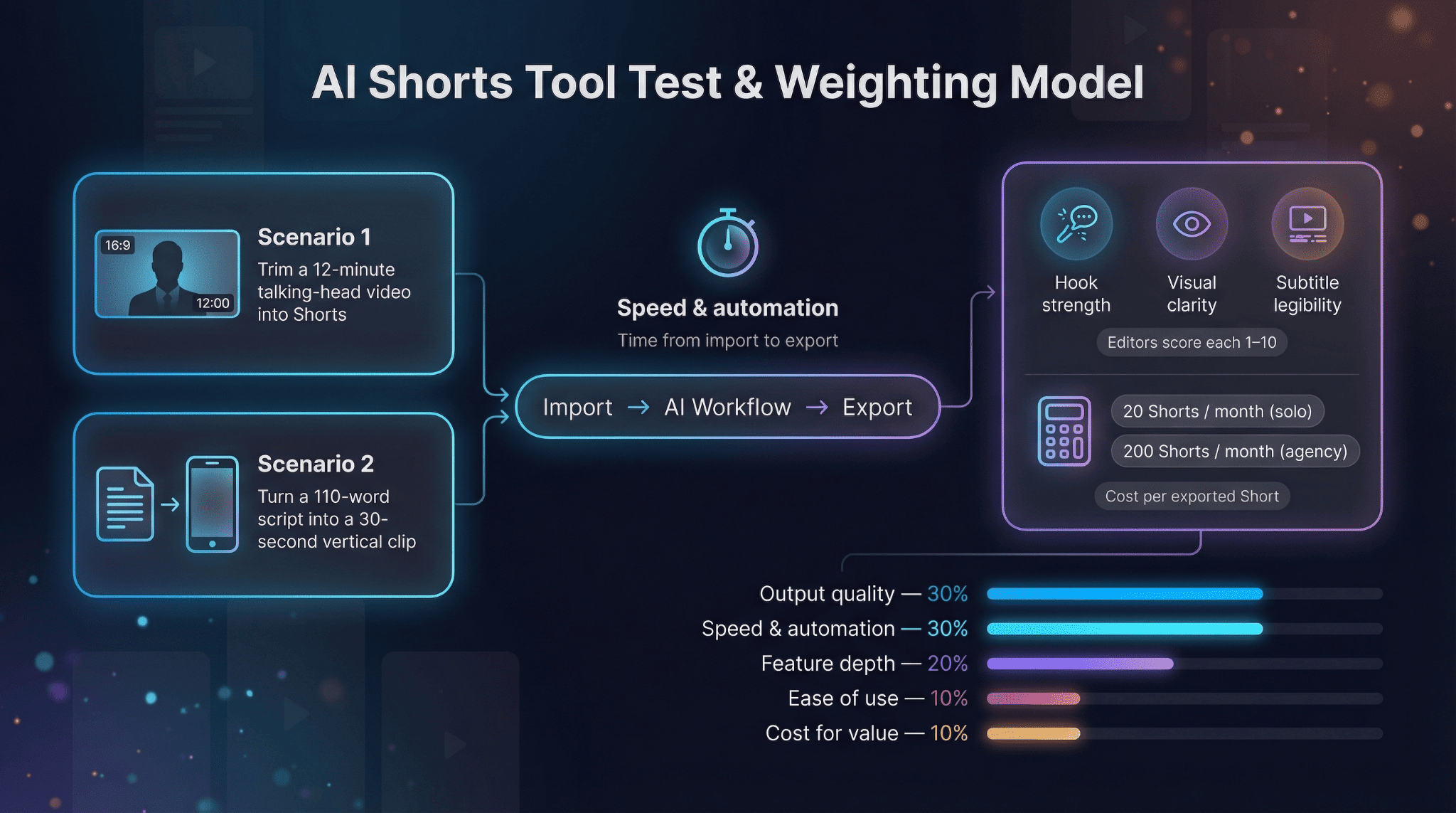
| Criterion | Measurement method | Weight |
| Output quality | Average editor score | 30 % |
| Speed & automation | Recorded workflow time | 30 % |
| Feature depth | AI tools unique to Shorts | 20 % |
| Ease of use | Manual tweaks required | 10 % |
| Cost for value | Dollars per exported Short | 10 % |
These weights drive every ranking that follows. Opinions stay parked.
1. Leonardo AI: Original Footage At The Speed Of Thought
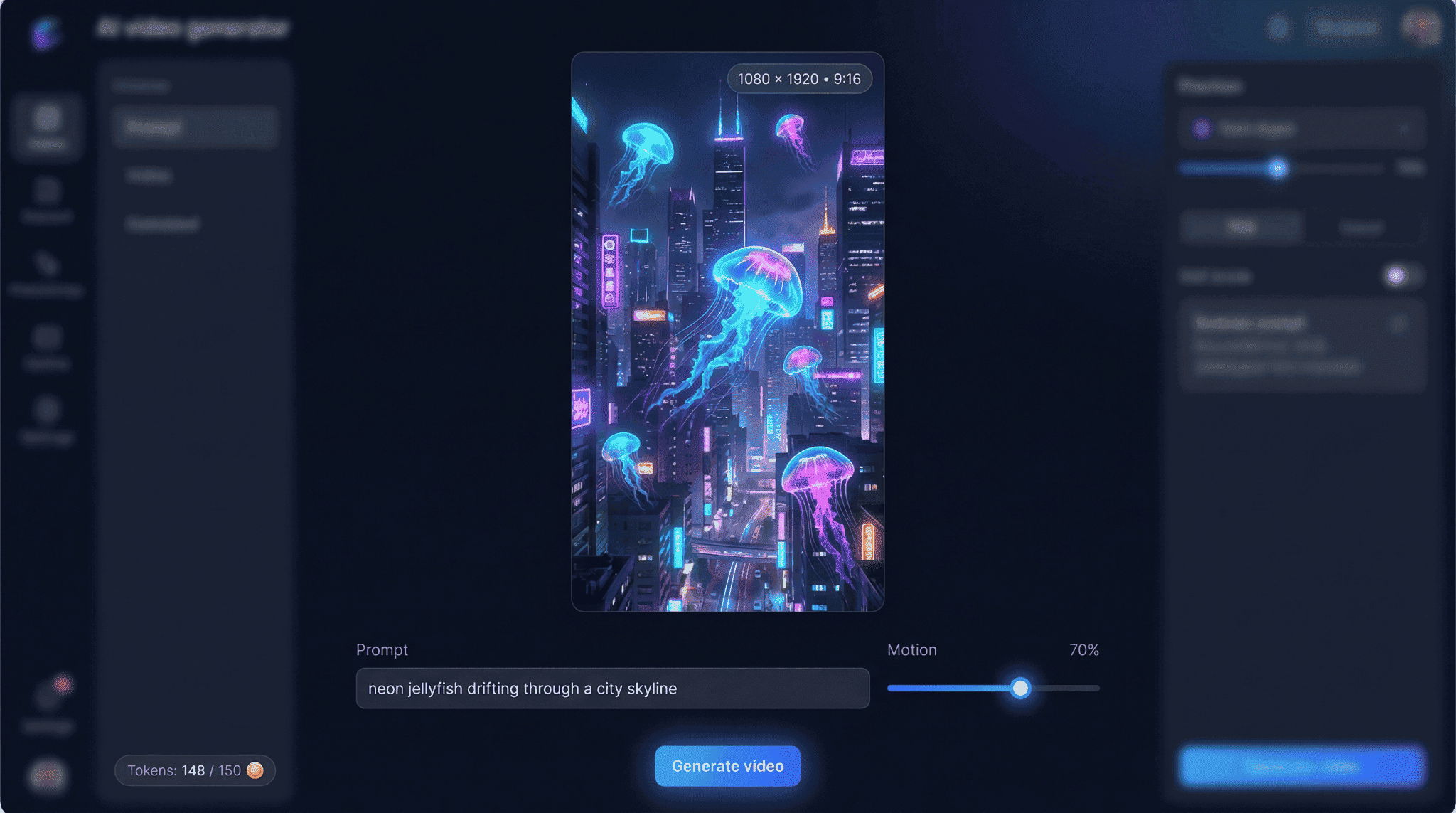
Imagine typing “neon jellyfish drifting through a city skyline” and, 40 seconds later, downloading a crisp 1080 × 1920 video ready for Shorts. That is Leonardo AI. Rather than trimming existing footage, it generates a vertical clip from scratch, using a motion-tuned diffusion model that keeps edges sharp even during rapid camera moves.
During our test Leonardo produced a 9-second animation (you can choose 3 to 30 seconds per render) with no timeline scrubbing or key-frames.
Why It Stands Out
- Motion control, not menus. One slider sets overall movement, and arrow keys nudge objects without graph editors.
- Token-based pricing. Free accounts receive 150 tokens every 24 hours, enough for several clips. Paid plans simply raise the monthly token pool, and you can top up as needed.
- Vertical-first presets. One click outputs 9 : 16, eliminating black-bar headaches.
Things To Know
Leonardo excels at fresh visuals but will not reformat a 16 : 9 backlog. Longer stories require stitching multiple clips, and premium models such as Veo 3.1 consume extra tokens.
If your channel trades in imagination—tech explainers, sci-fi lore drops, surreal travel teasers—Leonardo AI can supply scroll-stopping footage in less time than a coffee refill.
2. Opus Clip: Turn a Monologue Into a Carousel Of Hooks
Finishing a 25-minute tutorial only to spend an hour hunting teaser moments is tough. Opus Clip does the mining for you.
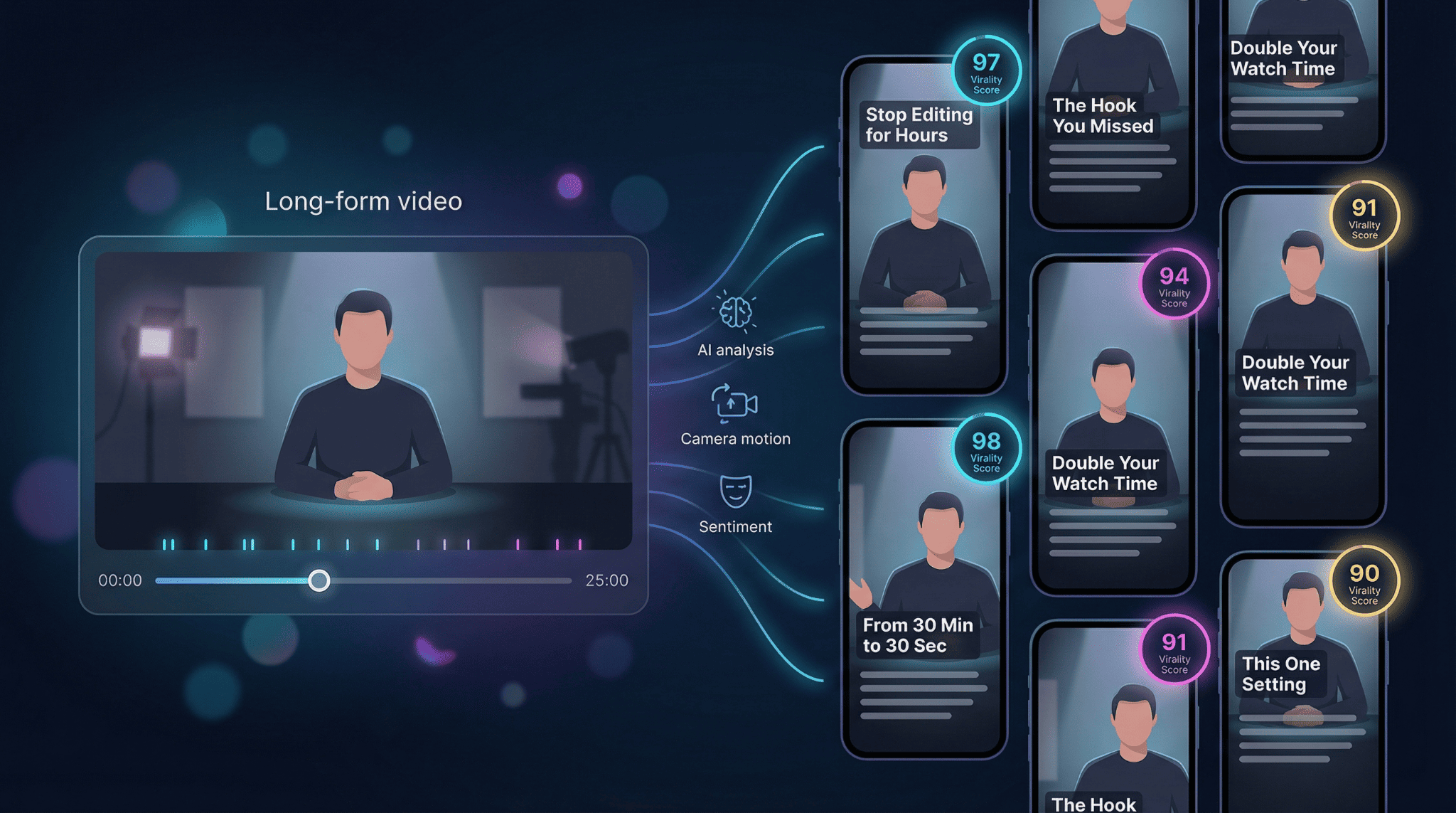
Drop in a YouTube link or raw file. The AI transcribes, judges sentiment, tracks camera motion, and slices highlights into vertical canvases faster than real time. In our June 2025 test it carved nine Shorts from a 30-minute video in seven minutes, each under 60 seconds with captions baked in.
The standout feature is the Virality Score, a 0–99 badge that predicts shareability by measuring hook strength, flow, and trend alignment. On our test channel, Shorts that scored 90 or higher earned roughly double the watch time of lower-scored clips.
Editing friction stays low. Click a cut point, nudge a timeline bar, tweak caption style in one side panel, then export straight to Drive, Dropbox, or your Shorts upload page.
Pricing At A gGlance
- Free Forever: 60 processing minutes per month, watermark on exports
- Starter: 150 minutes, faster render, no watermark
- Pro: higher quotas, team seats, and advanced analytics
3. InVideo: The Swiss-Army Studio For Custom Shorts
Some days you want autopilot; other days you need hands-on tweaks. InVideo sits in that middle lane, giving you AI speed without sacrificing creative control.
Open the browser editor, paste a short script, and the assistant drafts a video in about two minutes. Stock footage, upbeat music, and motion text are already sized for 9 : 16. For niches like motivational quotes, quick hacks, or product teasers, the first cut often lands on brand.
The real power shows up in the polish stage. Swap a clip, trim timing, drag your logo, or rewrite captions in plain English with no key-frames or nested menus. If you can edit a slide deck, you can finish a Short here.
Handy Extras
- Voice-over options: choose an AI narrator or record in the browser.
- Smart reframing: one click converts 16 : 9 to vertical, adds blurred padding, and keeps the subject centred, useful for repurposing archives.
- Template depth: more than 200 layouts tagged “Shorts” keep style consistent across topics.
Trade-Off
Because you can tweak everything, you probably will. Our average end-to-end build time reached 12 minutes, triple a one-click generator, but the polish shows.
Pricing Snapshot
- Free plan: 2 video minutes per week and 4 exports with watermark, according to InVideo’s help page.
- Business (Plus) plan: about $28 per month removes watermarks and lifts quotas to 50 AI minutes and unlimited exports.
Choose InVideo when brand aesthetics matter as much as speed. It lets you keep fingerprints on every frame while avoiding 2 am render headaches.
4. Synthesia: A Camera-ready Host That Never Needs Makeup
Need a presenter but not the studio time? Synthesia turns a written script into a photorealistic avatar who speaks 120 plus languages with accurate lip sync.
The workflow is slide simple. Pick an avatar, paste lines, choose a voice, and click Generate. About five minutes later you download an HD talking-head Short with no tripod and no retakes.
Why Creators Like It
- Avatar variety. From casual vloggers to news-anchor formals, more than 180 stock personas cover most tones.
- Multilingual at a click. One scene can mix languages, ideal for bilingual channels.
- Built-in layouts. Drop bullet points beside the host or swap virtual backgrounds to keep energy high.
Pricing Snapshot
- Starter plan: around $29 per month for up to 10 video minutes and access to 125 avatars.
- Higher tiers raise the minute limit and unlock custom avatars.
Limits To Note
Avatars stay mostly torso-up and cannot deliver slapstick or wide gestures. For meme-heavy niches, pair Synthesia clips with quick B-roll or motion graphics.
When authenticity matters and on-camera time is scarce, Synthesia steps in, always camera ready and never calling in sick.
5. Pictory: Spin Text Or Transcripts Into Scroll-Stopping Visuals
Dusty blog posts and forgotten webinar replays turn into Shorts in minutes with Pictory.
Paste an article URL or upload a transcript. The AI skims, pulls key sentences, and builds a vertical storyboard scene by scene, complete with stock footage, gentle transitions, and burnt-in captions. In our test a 1,200-word blog became a 55-second Short in eight minutes: five for the machine, three for swapping two stock clips for branded B-roll.
Why Word-First Creators Like It
- Auto-summary engine. Distills listicles, how-tos, and research round-ups, then lets you set a target length.
- Voice-over flexibility. Use an AI narrator, upload an MP3, or rely on silent captions, and duplicate the project to swap languages.
- Instant vertical presets. One click outputs 9 : 16 at up to 1080 p on paid plans.
Trade-Offs
Because visuals come from a shared stock library, originality depends on customisation, and default pacing can feel slideshow-like for meme-heavy niches.
Pricing Snapshot
- Starter: $25 per month (or $19 when billed annually) for up to 200 video minutes and 720 p exports, no watermark.
- Professional: $49 per month (or $39 annual) lifts exports to 1080 p and 600 minutes, plus Getty stock assets.
If your strength is words rather than cinematography, Pictory turns that mountain of text into a steady stream of Shorts the algorithm can’t resist.
Which Tool Fits Your Workflow? A Quick Decision Path
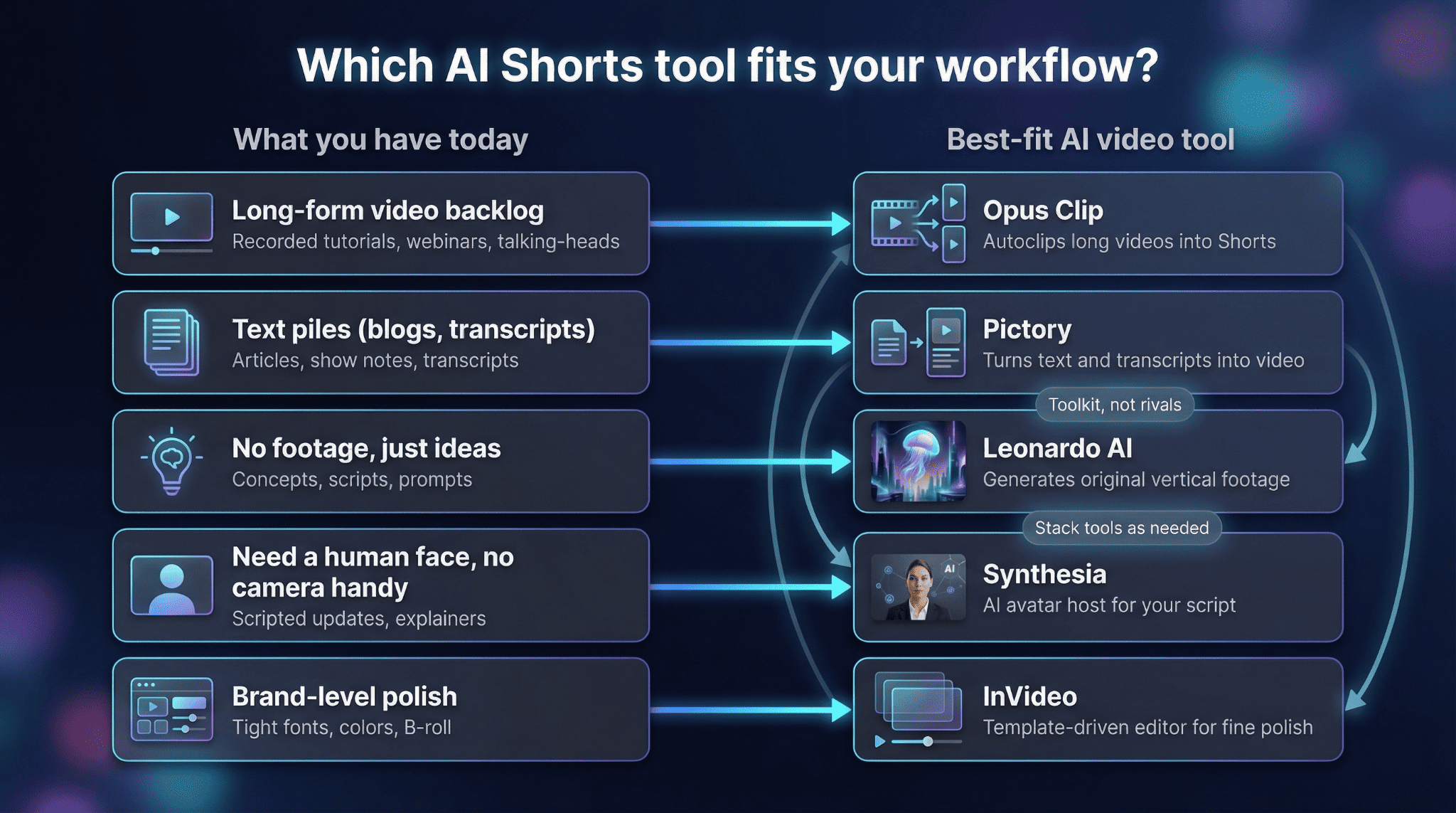
Begin with a practical check: What kind of material do you have today?
- Long-form video backlog → Opus Clip. It scans, slices, and scores footage before you can reply to comments, turning one 30-minute upload into a week of Shorts.
- Text piles (blogs, transcripts) → Pictory. Paste the words, set a target duration, and export a caption-rich Short in minutes.
- No footage, just ideas → Leonardo AI. Type a prompt or upload a sketch and return to crisp vertical motion art.and stack others as your ambitions grow. For a broader breakdown of current AI-powered video tools, see Top AI Tools for YouTube Video Creation.
- Need a human face, no camera handy → Synthesia. An AI presenter delivers your script in 120 plus languages, ideal for explainers or multilingual updates.
- Brand-level polish → InVideo. Fine-tune timing, fonts, and B-roll until every frame matches your style guide.
Treat these apps like a toolkit, not rivals: animate an intro in Leonardo, drop an Opus Clip highlight, then finish inside InVideo. Pick the one that removes today’s bottleneck, and stack others as your ambitions grow.