
Almost everyone who’s tried video editing has been there: you’ve got the footage, you’ve got the motivation — but no clear idea where to begin. When you’re in that spot, the same two tools usually get mentioned — Shotcut and Movavi Video Editor. Both are the real deal and get results. That said, they come from different schools of thought, and choosing one is basically choosing your editing style.
So let’s compare what matters most and figure out which one to go with.
Where they come from
The software Shotcut was introduced in 2011 as an open-source solution. No fees, no watermarks, no subscriptions — just a free tool that works on Windows, macOS, and Linux. It plays nicely with 100+ video and audio formats, no codec headaches involved. Development comes from a small, partly community-driven team — and that’s evident in both its advantages and its limitations.
Movavi Software was founded in 2004, currently headquartered in Cyprus. It’s a commercial product with straightforward business logic: you pay, you get a clean interface, customer support, and regular updates. Among beginners and people who just need to edit a video without diving into professional toolsets, Movavi is one of the most recognizable names around. It’s arguably the benchmark easy video editing software in its price range.
From recent data, it’s easy to see that simplicity is what people are looking for. With more creators and teams producing content, tools that are quick and easy to use are overtaking traditional pro software like Premiere Pro or Resolve. Shotcut and Movavi sit in the same space, but their approaches are worlds apart.
Interface: two different worlds
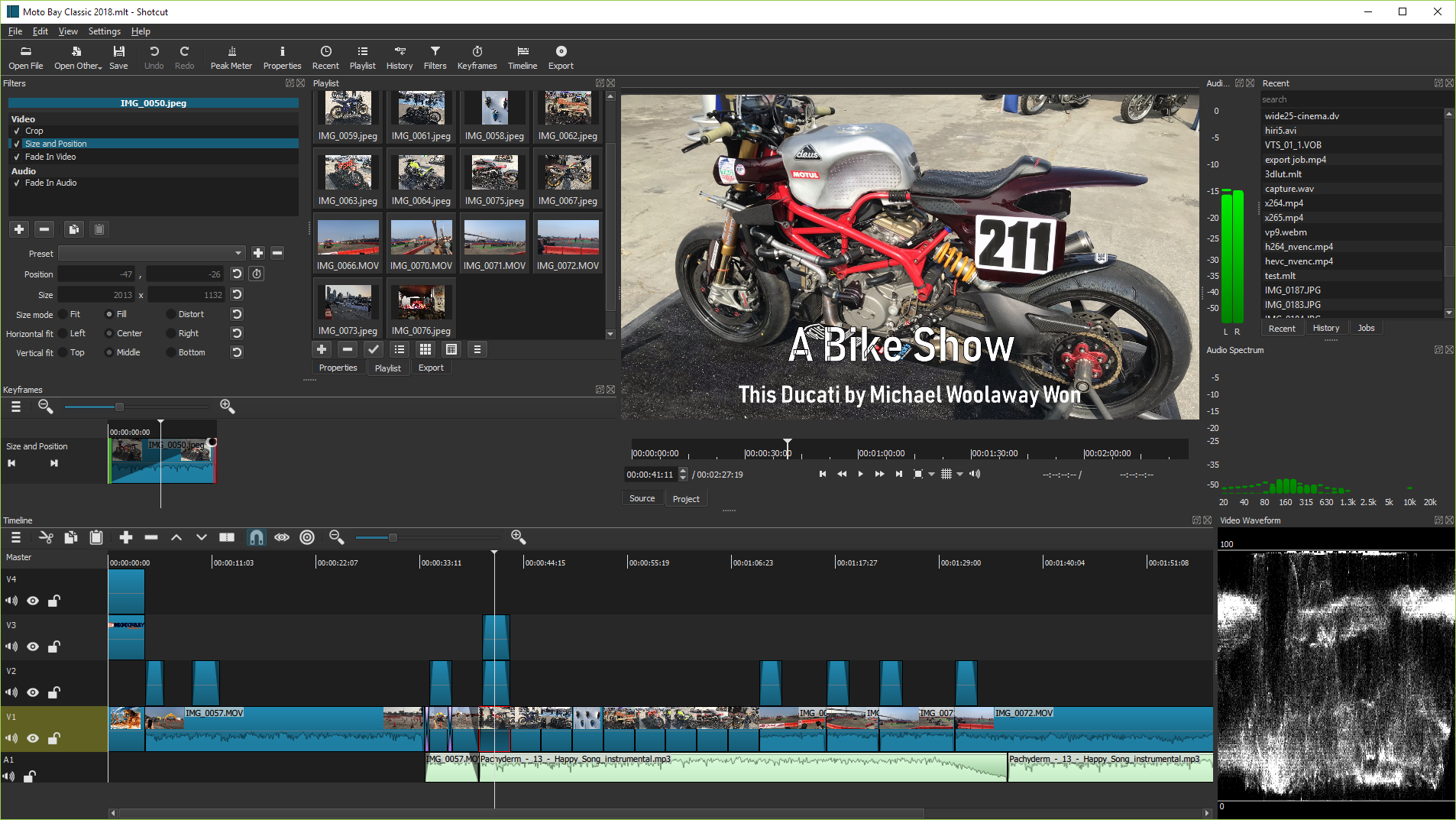
Shotcut greets users with an interface that’s technically flexible, but on first launch causes a fair amount of confusion. Panels can be moved, docked, hidden — but nobody tells you where to start. Forum reports suggest beginners often spend several hours just figuring out the basic workspace layout. It’s not a disaster, but the entry threshold is real.
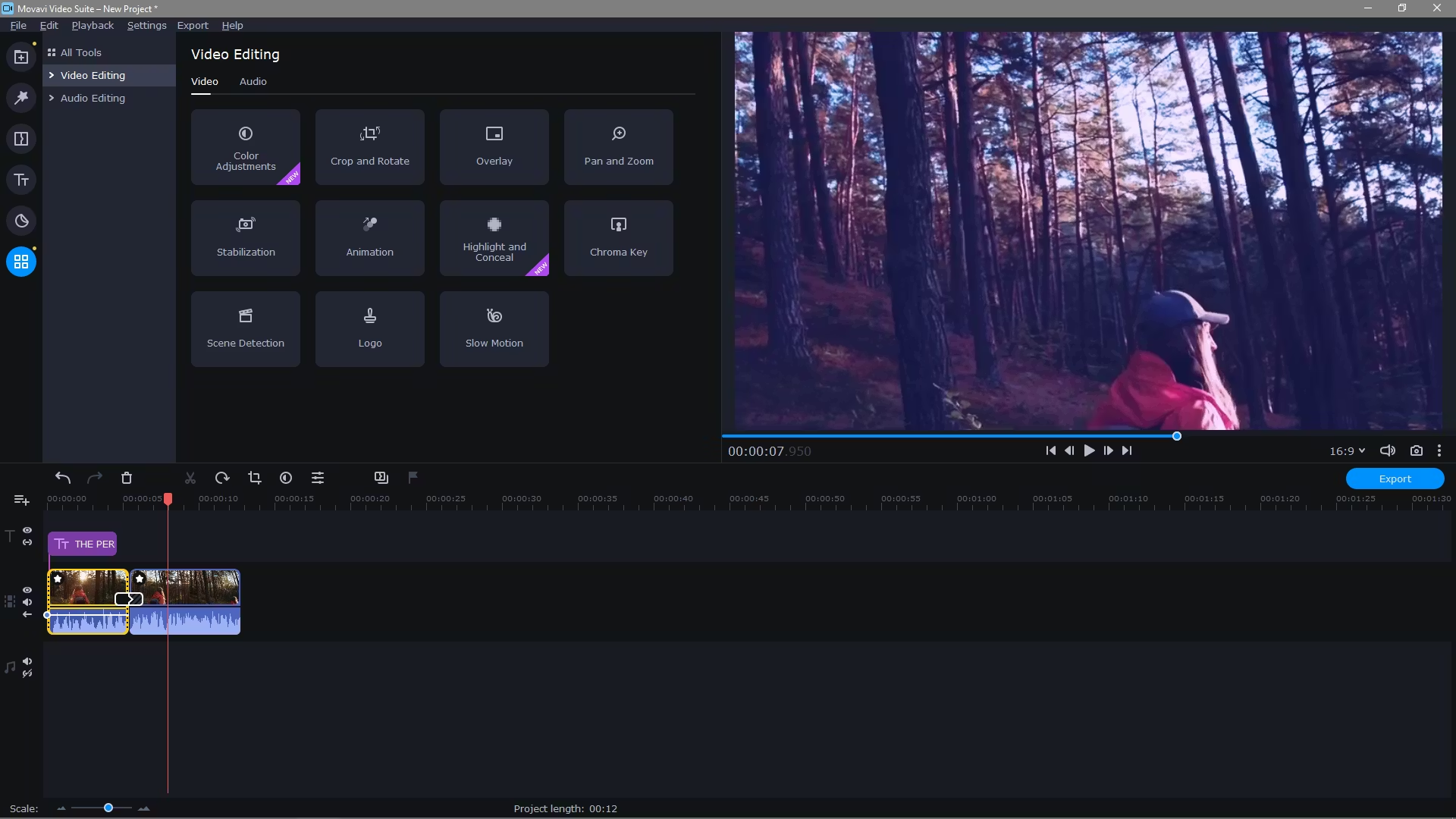
Movavi is built differently. The logic is simple: import → edit → export. Panels are labeled, transitions and effects are grouped, there’s a guided mode for complete beginners with step-by-step hints. As video making software for someone sitting down to edit for the first time — Movavi is nearly ideal in terms of usability. A finished result is achievable within an hour of installation.
But Shotcut has its own truth: once you learn it, working in it feels comfortable. Multi-track timeline, flexible filtering, keyframe animation, basic color correction. There’s more capability here than it looks from the outside. It just takes time.
What each one can do
A direct comparison of every detail doesn’t add much value — what matters is what actually makes each one different.
Shotcut:
- 4K, 8K, and 360° video support is built in — no need to pay more
- Proxy editing for lower-end machines (requires manual setup)
- Hardware GPU acceleration — Intel, NVIDIA, and AMD all supported
- LUT file support for color grading — a feature you’d normally expect from far more expensive video editing software
- No watermarks on export. Ever.
Movavi:
- One-click background removal (works better than expected)
- Library of 180+ transitions and 100+ filters
- AI-powered automatic highlight reel creation
- Motion tracking (Plus version only)
- Direct export to YouTube, Vimeo, with device-specific presets
Movavi has a stock media library, but most of the good content is behind an additional paywall. Shotcut offers no stock media at all. LUT files are completely unsupported in Movavi. For most users, that’s not a problem — but worth knowing going in.
Pricing: free vs. “almost free”
Shotcut is completely free. No hidden tiers, no export limitations. You don’t have to pay anything, since there’s no one asking for it. On the other hand, you won’t get any support. Just forums, documentation, and if you’re lucky, someone on Reddit with the same question.
Movavi starts free, but some features require payment. The free version puts a watermark on everything you export, so it’s mainly for testing purposes. To get the full feature set, you can choose between a monthly subscription or an annual plan, which includes extras like motion tracking and chroma key.
That’s a solid option when you’re working with projects regularly. You pay and use everything you need. One important caveat: when major updates drop, Movavi sometimes asks users to pay again for the new version. This isn’t always made obvious on the product page.
For anyone looking for video editing software for PC with a zero budget, Shotcut wins without debate. For someone willing to pay once for a polished experience, the Movavi Plus lifetime license is genuinely reasonable.
Stability and performance
Shotcut on older hardware can be frustrating. Proxy editing helps, but you have to set it up yourself. Freezes on complex projects do happen — especially on Windows with unusual codecs. Things have improved noticeably over the past two years, but perfect stability isn’t there yet.
Movavi is more polished in this area. Commercial development with a QA team makes a visible difference: the interface doesn’t stutter when you drop 10 clips onto the timeline, exports are predictable, and hardware acceleration works without configuration. On a mid-range laptop — say, an i5 with 8GB RAM — 1080p footage edits without discomfort. Shotcut on the same machine can lag depending on the format.
The bottom line
If the goal is fast results without friction — go with Movavi. Especially the Plus lifetime license. The interface doesn’t get in the way, the AI features genuinely work, and a clean finished video is achievable the same day you install it.
If the budget is zero, Linux support matters, or there’s a genuine interest in video editing tools with a real capability ceiling — Shotcut is the right call. It’s deeper than it looks. It just takes time to get there.
Calling either one the best video editing software outright would be dishonest — because it depends entirely on the person and the task. But the choice between these two is actually straightforward once you know what you actually need.
FAQ’s
Is Shotcut completely free to use?
Yes, Shotcut is entirely free with no hidden costs, subscriptions, or feature restrictions. Unlike many “free” tools that lock advanced features behind paywalls, Shotcut gives full access from the start. There are no watermarks on exported videos, no trial limitations, and no upsells within the software. However, the trade-off is that you won’t get dedicated customer support or a polished onboarding experience. Instead, users rely on community forums, documentation, and tutorials to learn and troubleshoot.
Does Movavi Video Editor offer a free version?
Movavi offers a free trial, but it is not intended for long-term use. The trial version places a watermark on all exported videos, which makes it unsuitable for professional or public content. Its primary purpose is to allow users to test the interface and features before purchasing. To remove the watermark and unlock full functionality, a paid license is required. This includes either a subscription or a lifetime plan, depending on how you prefer to use the software.
Which software is better for beginners?
Movavi is clearly the better option for beginners. Its interface is designed to guide users through the editing process step by step, reducing confusion and decision fatigue. Features are labeled clearly, tools are grouped logically, and most actions can be performed with drag-and-drop simplicity. Shotcut, while powerful, does not provide this level of guidance. Beginners often find themselves spending time just understanding how to set up the workspace before they can start editing. For someone new to video editing, Movavi offers a much smoother entry point.
Can Shotcut be used for advanced editing?
Yes, Shotcut can handle advanced editing tasks, especially for users who are willing to learn its system. It supports multi-track timelines, keyframe animation, filter stacking, and LUT-based color grading, which are features typically found in more professional software. However, the workflow is not as streamlined as high-end tools, and achieving complex results may require more manual effort. It is capable, but not optimized for speed or efficiency in advanced workflows.
Does Movavi support professional color grading tools?
Movavi does not support LUT files, which are commonly used for professional color grading. This limits its ability to achieve cinematic or highly stylized color looks. It does include basic color correction tools such as brightness, contrast, saturation, and simple filters, which are sufficient for everyday editing and content creation. For users who need precise control over color grading, this limitation may be significant, but for most casual and intermediate users, the built-in tools are adequate.
Which tool performs better on lower-end systems?
Movavi generally performs better on lower-end or mid-range systems without requiring additional setup. It is optimized to handle common editing tasks smoothly, even with limited hardware resources. Shotcut can also run on lower-end systems, but performance may suffer when working with high-resolution footage or multiple effects. To improve performance in Shotcut, users often need to enable proxy editing manually, which adds an extra layer of complexity. For users who want a smoother experience without technical adjustments, Movavi is the more reliable option.
Is there a watermark in Shotcut exports?
No, Shotcut does not apply any watermark to exported videos under any circumstances. This applies regardless of the features used or the length of the project. It is one of the key reasons why Shotcut remains a popular choice for users who want completely unrestricted editing without paying for software.
Which software is better for YouTube content creation?
Movavi is generally better suited for YouTube content creation, especially for users who prioritize speed and consistency. It includes ready-to-use templates, quick transitions, and direct export settings optimized for platforms like YouTube. This allows creators to produce and publish content faster. Shotcut, on the other hand, offers more control and customization, which can be beneficial for users who want to fine-tune their edits. However, it requires more time and effort to achieve the same results.
Does Movavi require an internet connection?
Movavi does not require a constant internet connection for editing. Once installed, the core editing features can be used offline. However, certain elements such as downloading stock media, accessing additional effects, and receiving updates do require internet access. Licensing and activation may also need an initial connection. In general, it functions well offline but is enhanced by occasional internet use.
Can projects be transferred between Shotcut and Movavi?
No, projects cannot be transferred directly between Shotcut and Movavi because they use different file formats and project structures. If you switch from one tool to the other, you will need to export your video as a final file and re-import it into the new software. This means you lose the ability to edit individual layers or make detailed adjustments to the original project.
Which software offers better support?
Movavi offers structured customer support, including help centers, direct assistance, and regular updates. This makes it easier for users to resolve issues quickly. Shotcut does not provide official customer support in the same way. Instead, users rely on community forums, online guides, and third-party tutorials. While the community can be helpful, responses may not always be immediate or consistent.
Is Shotcut suitable for long-term use?
Yes, Shotcut is suitable for long-term use, particularly for users who want a free tool with strong capabilities and are willing to invest time in learning it. Over time, users can become comfortable with its workflow and take advantage of its more advanced features. While it may not match the polish or efficiency of paid software, it offers enough depth to handle a wide range of projects without ongoing costs.